AI Flattened the Testing Pyramid. Here Are Six Tests to Add.
AI made every layer of the testing pyramid about equally cheap. These are the six tests I added above my unit tests in two days, with $0 spent on CI servers or device farms, each with the prompt that built it.

Pick the test you're missing Six kinds of test, each with a copy-and-paste prompt.
The testing pyramid was really a price list. The tests at the top were expensive to write, to keep working and to run, so I skipped them. AI made every price about the same.
I build two Android apps alone: Driftwell, a sleep app that plays all night with the screen off, and RuckPace, a GPS pace coach for rucking. Between them they had thousands of unit tests and not one that drew a screen, listened to TalkBack, or checked that playback pauses for a phone call and picks back up after.
One weekend in October Claude built the rest. It took two days and costs $0 a month to run: every test runs on a computer I already owned, and the phones I don’t own come from Firebase Test Lab’s free daily quota, so there’s no CI bill and no device-farm bill. The one cost left is time, so the slow tests run after the merge, where nobody waits on them.
Pick the test you’re missing
Each section is one kind of test: what it finds, the prompt, and how it works in my apps. Add only the ones you’re missing.
Whichever you add, finish with the two prompts in Before you trust any of them. I ran everything with Superpowers, so each prompt is a goal and a definition of done, not a recipe.
1. Catch broken layouts on every phone size
Screenshot tests: small phone, dark mode, large text, landscape
The prompt
Add a screenshot test tier with Robolectric and Roborazzi. Render every main screen on five setups: phone light, phone dark, a 360dp small phone, font scale 2.0, and landscape. Compare each render with an approved image, and fail the pull request on any difference until I approve it. Also fail on words broken mid-word, text touching text, clipped text, and controls squeezed below 24dp. Show me every finding before you fix or suppress anything.
How it works
Screens are drawn without an emulator, using Robolectric and Roborazzi, on five setups: a regular phone in light and dark, a small phone, double font size, and landscape. The first run at double font size was the worst:
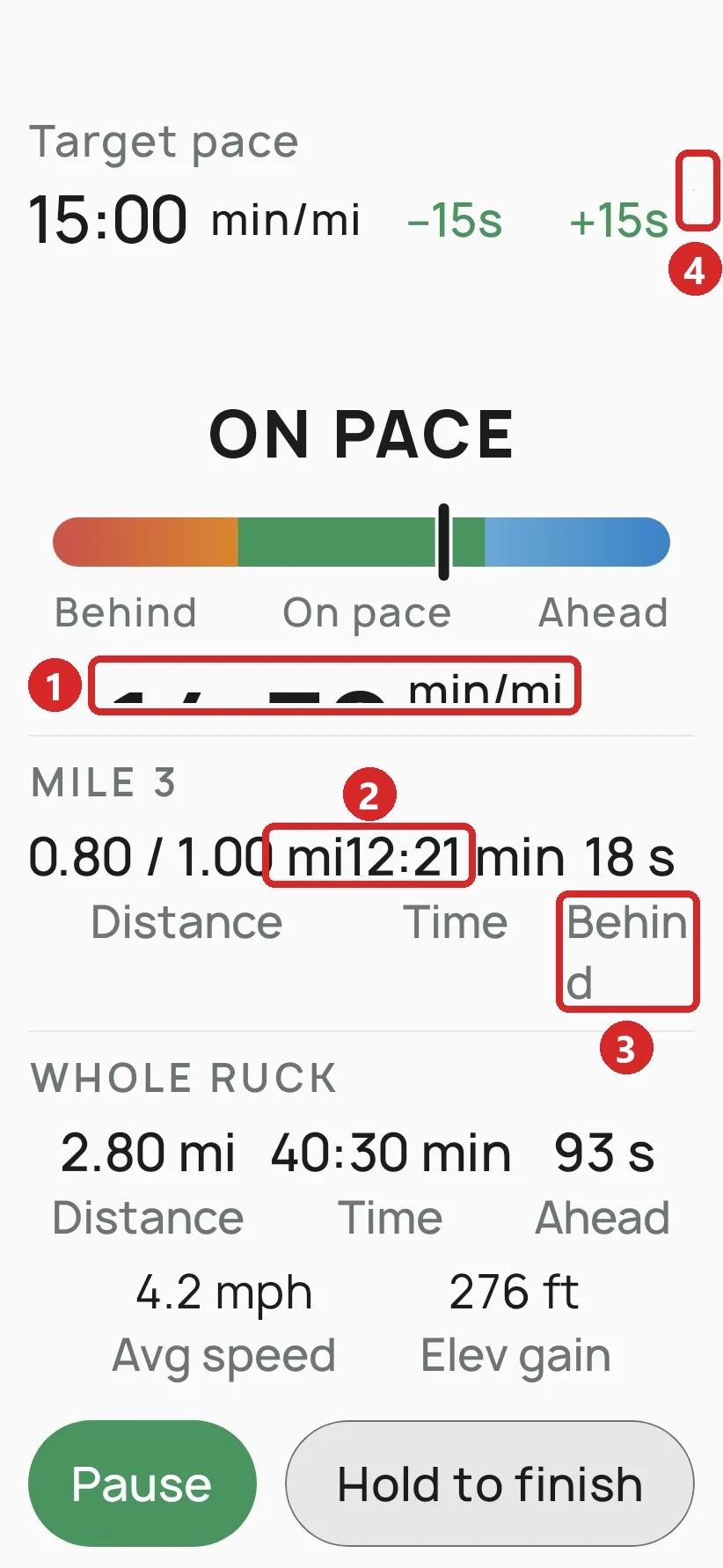
I fixed each one and then made it a check, so a word broken in half, text touching text, or a clipped label fails the build on its own.
2. Catch the accessibility bugs most apps ship with
Automated accessibility checks on every screenshot
The prompt
Run Roborazzi's accessibility checks on every screenshot render, and add the screenshot tier first if there isn't one. Fail the build on missing labels, low contrast and duplicate spoken text. Before trusting any of it, write a guard test that renders an unlabeled button and unreadable text and proves the build goes red. Show me every finding before you fix or suppress anything.
How it works
Each screenshot also goes through Google’s accessibility checks, the same ones the Play Store’s pre-launch report runs. The biggest find was what TalkBack, Android’s screen reader, said out loud on Driftwell before and after the fixes:
At first the checks passed everything. An older test library showed the checker a blank screen, so a button TalkBack couldn’t name still passed, and the build stayed green.
That’s why the prompt asks for a guard test: an unlabeled button and unreadable text the checks must reject. If they ever stop catching problems, that test fails first.
3. Prove your app survives real-life interruptions
Emulator tests: phone calls, headphones out, deep power saving
The prompt
Swap in whatever your app has to survive in the background.
Add instrumented tests that run on an emulator the script starts itself, on a fixed console port. Test what my app must survive: a phone call (dialed through the emulator console), another app taking audio focus, headphones unplugged, and screen off in deep Doze. Pin ANDROID_SERIAL so nothing installs on a phone that happens to be plugged in. Run them in CI on merges to main only, never on pull requests. Use a throwaway probe to check any system output format before you parse it.
How it works
Driftwell’s job is to keep playing for hours while Android and other apps try to stop it. None of that shows up in a unit test, so eight tests run on an Android 16 emulator after every merge. Each one does to the app what a real night does:
The phone call is my favorite. The emulator can fake an incoming call, but only from the computer it runs on. The test runs inside the emulator, so it reaches back out to the computer and dials itself.
4. Turn your real-world use into tests
Replay tests from recorded GPS or sensor data
Fake GPS only tests the cases you think of. A real walk brings the ones you don’t, like tree cover, a locked screen or a pace that wanders, and once it’s recorded, every later change has to pass it.
The prompt
For anything that depends on the world outside: GPS, sensors, Bluetooth.
Add a debug-logging switch in settings that records every raw GPS fix and every decision the app makes to a file the user can share. Write a replayer that feeds a log back through the same code the app runs. Then turn my next real recording into a permanent test, with the coordinates shifted so it can't show where I live, and prove the shift changes no distance, pace or alert.
How it works
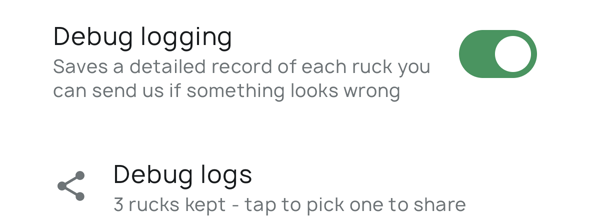
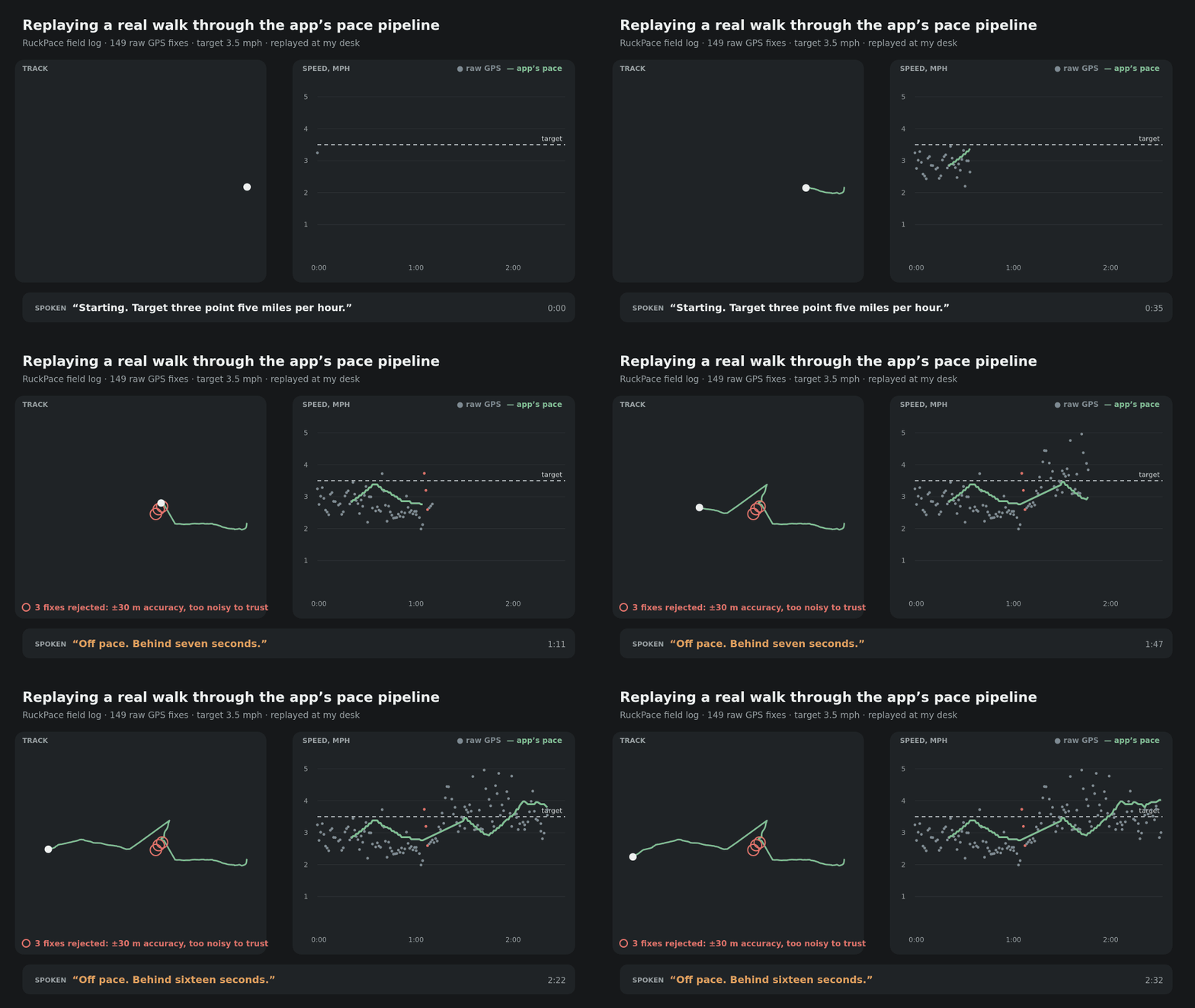
I recorded the GPS on an ordinary walk to my mailbox. Now every change to the pace engine is replayed against that walk on every pull request, so a change that gets distance, pace or a spoken alert wrong fails before it ships.
These logs are real walks near my house, so every point is shifted 145 degrees east before it’s committed, and every distance, pace and alert comes out the same. The full story is in how I ship these apps.
5. Find crashes on phones you don’t own
Robo crawls on real devices in Firebase Test Lab, free
I test on one or two phones. My users run hundreds of models, many with the maker’s own changes to Android, and a crash that only happens on one of them reaches them before it reaches me.
The prompt
Test Lab’s free plan has no card on file, so it can’t bill you.
Before my release script promotes a build to production, have it download the APK Google Play will serve and run a Firebase Test Lab Robo test on two real and three virtual phones. Ship only if every device passed: a timeout or a missing result counts as a failure. Stay on the free Spark plan with no billing account. Add a nightly job that spends the rest of the daily quota crawling the live build on a rotating set of phones and opens a GitHub issue with the stack trace when one crashes. Release at a 20% staged rollout, and refuse any commit that isn't merged to main with every CI check green.
How it works
Google Play’s pre-launch report is meant to do this for free. It never ran for me, even after two fresh uploads to closed testing. Google support later told me why: the report no longer runs on every upload, only when Google has spare capacity. It runs on Firebase Test Lab, so I went there directly. The free plan caps you at 5 runs a day on real phones and 10 on virtual ones, with no billing account, so there’s nothing to charge.
- Before every production release, Robo, Test Lab’s crawler, works through the exact APK Play will serve on two real and three virtual phones. A crash, a timeout or a missing result stops the release.
- Every night, the leftover quota crawls the live build on a different set of phones, and a crash becomes a GitHub issue with the stack trace.
Robo finds a crash on a screen, not a session that dies after an hour. The same prompt sets a 20% staged rollout, so Android vitals sees a slice’s crash rate first. With users this few, I still override it and release to everyone.
6. A QA checklist for what can’t be automated
Manual tests, written by Claude
AI builds features faster than I can look at them, and each one comes with tests saying it works. A passing test proves the code does what it was told to do. It can’t tell me whether that’s what a user wants. The checklist is how I check the product: one page per change, so I keep up with what’s shipping instead of trusting a green build.
The prompt
For TalkBack, real purchases, and anything that needs a person’s eyes.
Write a manual QA page for this change as one HTML page I can use on my phone. Each case is a card with Do steps, Expect bullets, a Pass / Fail / Skip toggle and a notes field, with a running tally at the bottom. Put the Play build, commit and PR at the top, and save results on the page. For TalkBack, write exactly what it should read aloud. Only include what the automated tests can't prove, and say why at the top.
How it works
Manual testing took longer than anything else here, and TalkBack longest of all: you turn it on, close your eyes, and swipe through every screen listening. So any change that needs a person comes with a QA page Claude writes for someone holding a phone, and the page keeps the results.
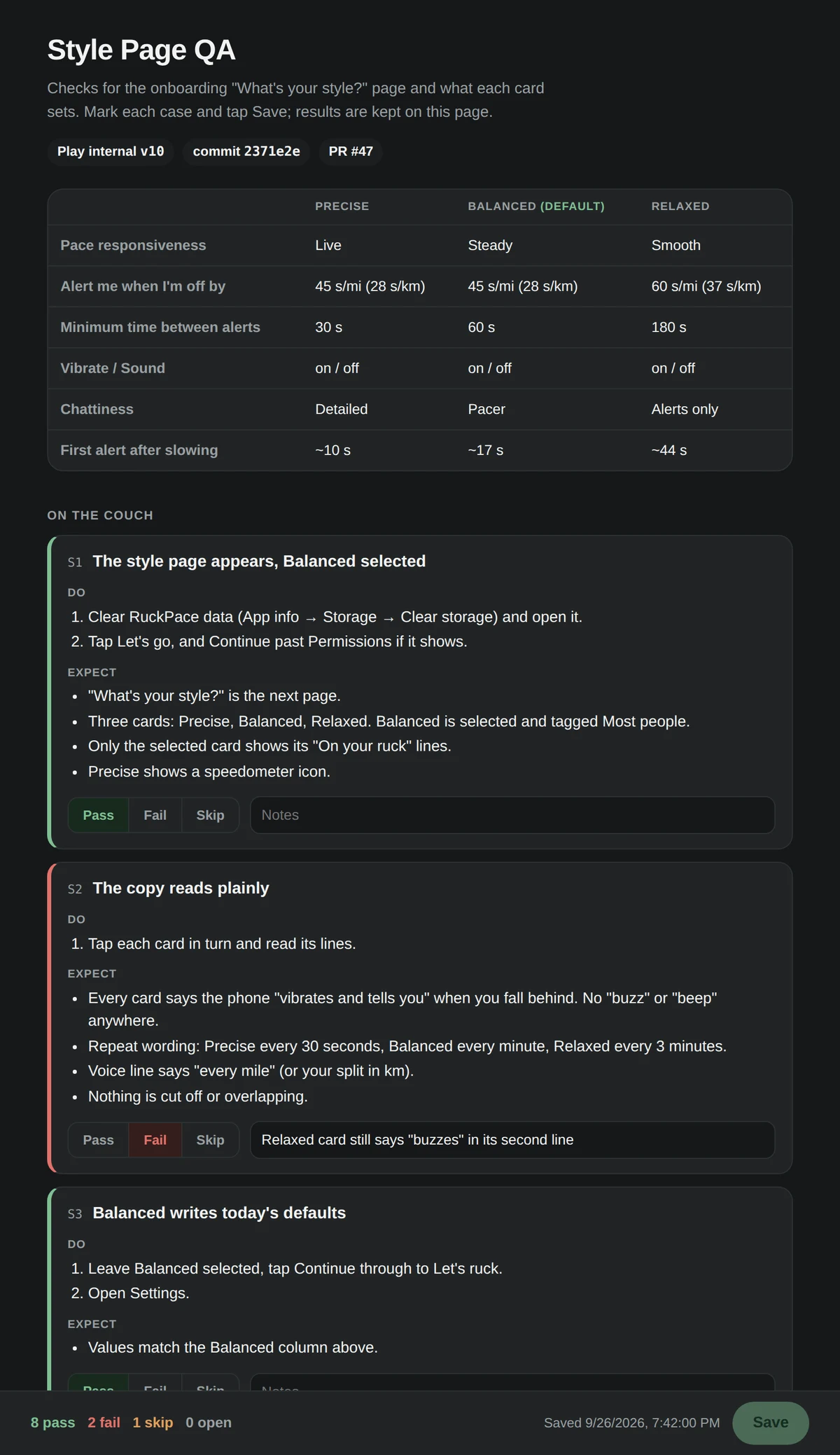
It lists what the automated tests already cover, so I only test what they can’t, and it heads off false alarms: “Get Plus” always fails on the test build, so purchases get tested on the internal track.
Before you trust any of them
A test that checks nothing looks exactly like one that works, and Claude writes them faster than I can read them. So every test has to fail once before I trust it.
- Break itMake one realistic change to the app, like deleting the line that pauses when headphones come out.
- Watch it failRun the test. It has to go red, with the message you expected.
- Put it backUndo the change. Green again.
The dangerous mistakes were the ones that passed. The first accessibility gate checked nothing, and a volume check would have said the sound never dropped while it visibly did. A red test also has to fail for the right reason: one that runs out of memory after 10 minutes proves nothing.
Ask for this after any batch of tests Claude writes:
For each test you just wrote, make one realistic change to the production code that the test should catch, run it, and show me the failure message. Then revert it. If a test stays green, say so: that test is the bug. A failure from a timeout or running out of memory doesn't count.
Then have a fresh session review the work. Mine found a safety check that didn’t check what its comment promised:
Review this branch as someone who didn't write it. Look for tests that would pass while checking nothing, comments that promise a check the code doesn't make, and anything that could touch my own phone, emulator or data. Rank what you find, and only flag what you can point to in the code.
A test nobody has watched fail is a guess, and when AI writes tests faster than anyone can read them, watching them fail is the review.
Where each test runs
The pyramid still holds for one thing AI can’t fix: waiting. A ten-minute test still takes ten minutes, so put that wait where it costs the least. This is my pipeline.
- Pull requestGitHub Actions, self-hosted runner
- Merge to main
- Everything from the pull request
- Interruption tests on an emulator
- Internal testing
- QA checklist on my phone
- A few testers
ship-testersskill →fastlane android testers - Release gate
- Crash crawl in Test Lab on the same 5 phones every release, 2 real and 3 virtual
- Any crash blocks the release
ship-productionskill →fastlane android production - Production
- 20% staged rollout, then everyone
- Android vitals watches crash rates
- Every night, on the live build
- Crash crawl in Test Lab on 9 different phones each night, working through every device Test Lab has
- Blocks nothing: a crash becomes a GitHub issue
fastlane android robo_rotation. A Claude Code startup hook lists open crashes
The $0 also depends on where it runs. GitHub’s free minutes ran out two days into my month; a self-hosted runner on a machine I already had costs nothing.
Move this repo's CI to a self-hosted runner on this machine. Unit tests and lint run on every pull request. Keep the repo private so no fork can run code on my machine, and tell me anything the hosted runner provided that this one won't.
Two things most people reach for first aren’t on the chart: a matrix of emulators across five Android versions, and a paid device farm. I priced both, and they’re in the next section.
What’s still expensive
Two days and $0 didn’t buy everything. There are tests I still don’t run, and problems I haven’t fixed.
Tests I don’t run
- A paid device farm. Test Lab past the free quota costs $5 an hour per real phone and $1 per virtual one; AWS Device Farm is $0.17 a device-minute. The free quota already covers a release gate and a nightly crawl.
- Emulators on five Android versions. Free, but five times the 11-minute run. The nightly crawl covers other versions instead.
- A real eight-hour night in CI. CI runs two minutes of deep power saving. The real night happens on my nightstand.
Where it’s still rough
- Google’s free crash report never ran. Play promises a pre-launch report from real phones. I uploaded to closed testing twice and never got one. Google support says it now runs only when they have capacity, and the Play Console doesn’t tell you. Test Lab does that job now.
- Crashes in Driftwell’s speech code are unreadable. That code comes from a library that strips out what a crash report needs, so a crash there shows up as a list of memory addresses. Play’s documented one-line fix does nothing for it.
- Some phone makers kill apps overnight. Some brands stop background apps far more aggressively than stock Android, and a sleep app that dies at 2am is exactly the review I’m afraid of. Nothing in this setup runs on those phones, so I don’t know whether Driftwell survives them.
What actually took the time
The code was the fast part. The time went into breaking every test on purpose and listening to TalkBack read every screen.
The testing pyramid taught me these tests were fragile and would take more time to debug than they’d ever save, so I skipped them. They weren’t. Claude wrote them, they found more than a dozen real bugs across both apps, and they’re staying.